CKP Product Technical Guide
Coredge Kubernetes Platform — Coredge.io
A comprehensive technical reference for the CKP platform, covering distribution, management layer, infrastructure providers, APIs, cluster lifecycle, and operational guidance.
Version 1.0 | April 2026
01 Platform Overview
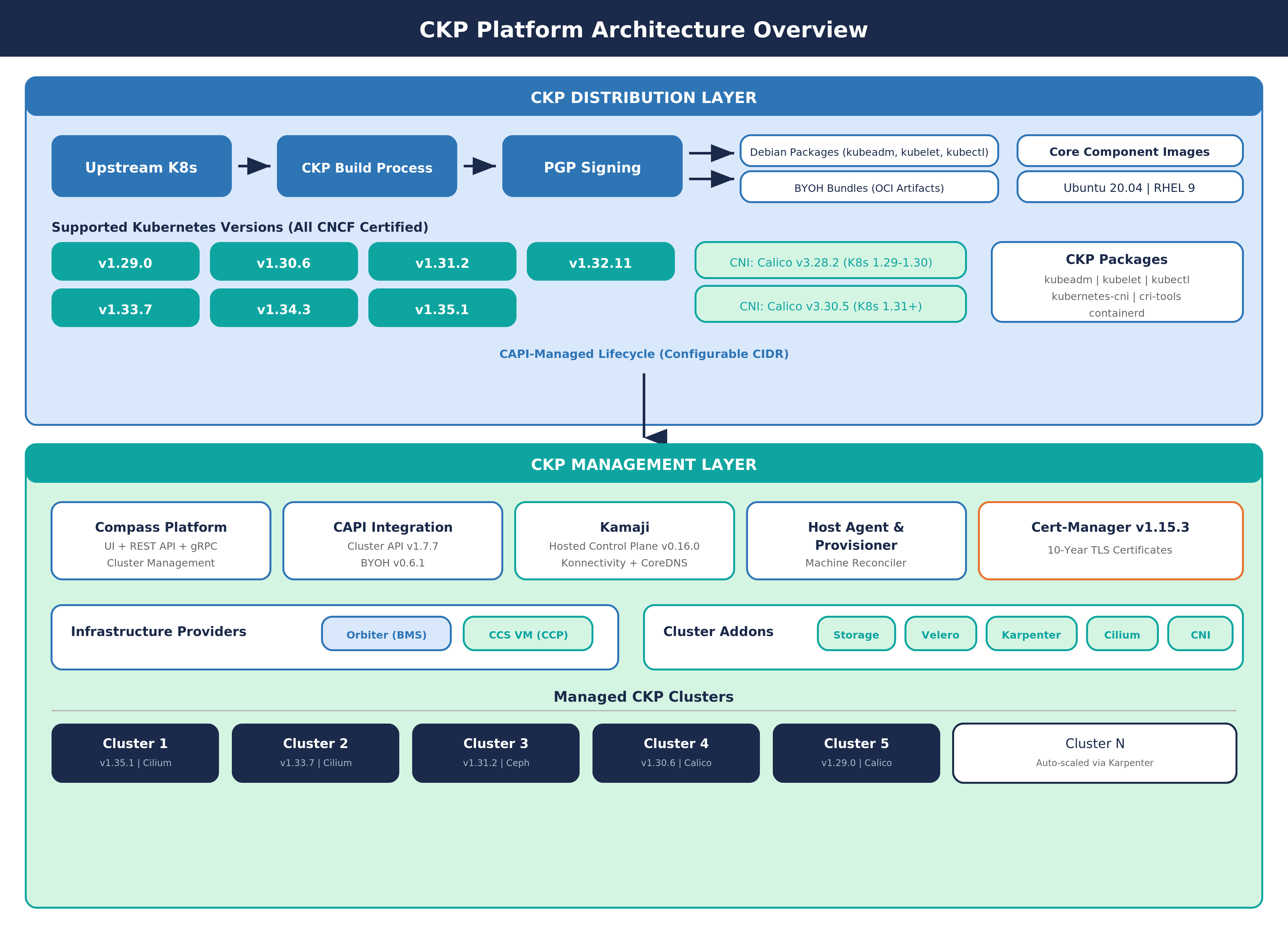
CKP (Coredge Kubernetes Platform), also known as Coredge Kubernetes Platform, is a custom Kubernetes distribution built on top of the upstream Kubernetes repository. CKP versions are maintained in line with community releases, with the advantage of Enterprise support. All supported CKP Kubernetes versions are CNCF Certified, ensuring conformance with the official Kubernetes specification.
CKP is not just a management plane — it is a full-stack offering that spans two layers:
-
CKP Distribution Layer — Custom-built Kubernetes binaries (kubeadm, kubelet, kubectl) tagged and signed by Coredge, with Coredge-hosted core component container images (kube-apiserver, kube-scheduler, kube-controller-manager, etcd, CoreDNS, kube-proxy, pause). This is the "CKP distro."
-
CKP Management Layer — Cluster lifecycle management via CAPI (Cluster API), with API and addon integration through the Compass platform.
CKP Advantages
- Automated rollouts, scaling, and rollbacks — Automatic replica creation, hardware distribution, rescheduling on node failure, on-demand scaling
- Service discovery, load balancing, and network ingress — Complete networking solution for internal discovery and external exposure
- Stateless and stateful applications — Full support for both workload types
- Storage management — Persistent storage abstracted across cloud and local providers
- Declarative state — YAML manifests define desired state; Kubernetes transitions automatically
- Works across environments — Cloud, edge, and developer workstations
- Highly extensible — Custom object types, controllers, and operators via CRDs
02 CKP Distribution
2.1 How the CKP Distro Works
CKP takes the upstream Kubernetes source code at a specific version and produces custom-tagged binaries with a -ckp version suffix (e.g., v1.31.2-ckp). This means CKP binaries are functionally identical to upstream Kubernetes, but are versioned, packaged, and digitally signed by Coredge.io for enterprise traceability and supply chain integrity.
The output of this process is a set of custom Debian packages (kubeadm, kubelet, kubectl) and a set of Coredge-hosted container images for all core Kubernetes components (kube-apiserver, kube-controller-manager, kube-scheduler, kube-proxy, etcd, CoreDNS, pause) published to the Coredge Docker Hub registry.
2.2 Supported Kubernetes Versions
CKP currently supports the following CNCF Certified Kubernetes versions:
| Version | CNI (Calico) | CNCF Certified | Status |
|---|---|---|---|
| v1.33.7 | v3.30.5 | Yes | Supported |
| v1.34.3 | v3.30.5 | Yes | Supported |
| v1.35.1 | v3.30.5 | Yes | Supported (Latest) |
Users select the desired Kubernetes version during cluster creation through the Compass UI or API.
2.3 CKP Packages
CKP ships the following packages as custom-built Debian binaries for AMD64 architecture:
| Package | Description |
|---|---|
| kubeadm | Cluster bootstrapping and lifecycle management tool |
| kubelet | Primary node agent that manages pod execution |
| kubectl | Command-line tool for interacting with the Kubernetes API |
| kubernetes-cni | Container Network Interface plugins |
| cri-tools | Container Runtime Interface diagnostic tools (crictl) |
| containerd | Container runtime bundled with CNI support |
All packages follow the CKP versioning scheme and are digitally signed by Coredge.io.
2.4 Package Signing and Integrity Verification
All CKP packages are digitally signed by Coredge.io using PGP to ensure supply chain integrity and enterprise traceability. Before any CKP installation proceeds, a mandatory integrity verification is performed automatically by the installation scripts. This verification includes PGP signature validation against the Coredge public key and confirmation that the package maintainer field is set to Coredge.io. If either check fails, the installation is aborted.
2.5 BYOH Bundle Distribution
For CAPI-managed cluster provisioning, CKP packages are distributed as BYOH (Bring Your Own Host) bundles hosted on the Coredge Docker Hub registry. Each bundle is an OCI-compliant image artifact that contains all required CKP packages for a specific Kubernetes version and operating system. Bundles are pulled onto target hosts using the imgpkg tool during the host provisioning process.
| Operating System | Availability |
|---|---|
| Ubuntu 22.04, Ubuntu 24.04 | Available for all supported K8s versions (v1.33.7+) |
| Red Hat Enterprise Linux 9 | Available for all supported K8s versions (v1.33.7+) |
Each bundle is published as an OCI artifact per Kubernetes version and OS combination, ensuring precise version-locked delivery.
03 Core Component Images
CKP replaces the default upstream Kubernetes image registry with Coredge-hosted container images served from the Coredge Docker Hub registry. The kubeadm configuration is set to point all image pulls to the Coredge registry, ensuring all core components are sourced from Coredge's signed and maintained image set.
3.1 Image Components
| Component | Description |
|---|---|
| kube-apiserver | Kubernetes API server |
| kube-controller-manager | Controller manager |
| kube-scheduler | Pod scheduler |
| kube-proxy | Network proxy |
| etcd | Cluster state store |
| coredns | DNS service |
| pause | Pod infrastructure container |
3.2 Image Version Mapping
Each CKP Kubernetes version ships with specific component image versions, all hosted under the Coredge Docker Hub registry:
| K8s Version | etcd | CoreDNS | Pause |
|---|---|---|---|
| v1.33.7 | 3.5.15-0 | v1.11.3 | 3.10 |
| v1.34.3 | 3.5.15-0 | v1.11.3 | 3.10 |
| v1.35.1 | 3.5.15-0 | v1.11.3 | 3.10 |
The kube-apiserver, kube-controller-manager, kube-scheduler, and kube-proxy images are tagged with the same version as the Kubernetes release (e.g., v1.31.2).
04 Compatibility Matrix
| K8s Ver | etcd | CoreDNS | Containerd | CRI | Pause | Calico | CNCF |
|---|---|---|---|---|---|---|---|
| v1.33.7 | v3.5.15-0 | v1.11.3 | 1.7.0+ | v1 | v3.10 | v3.30.5 | Yes |
| v1.34.3 | v3.5.15-0 | v1.11.3 | 1.7.0+ | v1 | v3.10 | v3.30.5 | Yes |
| v1.35.1 | v3.5.15-0 | v1.11.3 | 1.7.0+ | v1 | v3.10 | v3.30.5 | Yes |
05 Dependencies and Prerequisites
5.1 System Prerequisites
| Dependency | Details |
|---|---|
| Supported OS | Ubuntu 22.04, Ubuntu 24.04, Ubuntu 22.04, Red Hat Enterprise Linux 9 |
| Container Runtime | Containerd (v1.6.14+) |
| OCI Runtime | runc (v1.1.3 – v1.1.10) |
| CRI Tools | crictl (v1.27.0) |
| CNI Plugins | v1.1.2 – v1.3.0 |
| Helm | v3 (for addon installation) |
5.2 Kernel and System Requirements
CKP requires specific Linux kernel modules (overlay filesystem, bridge netfilter) and network forwarding settings (IPv4 forwarding, bridge iptables filtering) to be enabled on all cluster nodes. These are configured automatically by the CKP installation scripts. Additionally, swap must be disabled on all nodes, which is a standard Kubernetes requirement.
5.3 Supported CNIs
| CNI | Description |
|---|---|
| Calico (v3.30.5) | Default CNI in Compass UI. Networking and security solution for Kubernetes. |
| Cilium | Cloud native networking using eBPF kernel technology. Used as default CNI in CAPI-provisioned clusters. |
06 Cluster Creation and Operations
6.1 Compass UI Cluster Creation
The primary way to create CKP clusters is through the Compass UI. The UI presents a guided workflow where users configure:
| Setting | Options / Details |
|---|---|
| Kubernetes Version | v1.33.7 through v1.35.1 (selectable, all CNCF Certified) |
| Networking (CNI) | Calico (default) |
| Networking Version | v3.30.5 |
| Worker Host Group | Selection from pre-registered host groups |
| Worker Nodes | Number of worker nodes (minimum 1) |
The Node Configuration section allows managing master host node settings, worker node setup, and the cluster's Virtual IP for communication. The control plane uses Managed Control Plane (hosted control plane), so users only configure worker nodes and host group assignment.
6.2 Manual Cluster Installation (Standalone)
For standalone installations outside the Compass UI, CKP provides automated installation scripts that handle the full master node setup:
- Package integrity verification — PGP signature and Coredge.io maintainer validation
- System dependency installation — Required system packages and CRI tools
- Container runtime setup — Containerd with Coredge-standard configuration
- OCI runtime installation — runc runtime
- Network configuration — Kernel modules and IP forwarding settings
- CKP package installation — kubeadm, kubelet, and kubectl from the CKP distribution
- Swap disabling — Required for Kubernetes operation
- Cluster initialization — Using kubeadm with CKP-specific configuration
- kubectl configuration — Admin access setup
- Helm installation — For addon management
- CNI deployment — Calico (via tigera-operator) with configured pod CIDR
- CSI driver deployment — OpenEBS hostpath as default storage class
6.3 Kubeadm Configuration (CKP-Specific)
The key CKP-specific configuration in kubeadm is that both the main image repository and the DNS image repository are pointed to the Coredge Docker Hub registry instead of the upstream Kubernetes registry. This ensures all core component images are pulled from Coredge's signed and maintained image set.
6.4 Worker / Additional Master Nodes
Worker and additional master nodes follow a similar dependency installation process, after which they join the cluster using a join token generated during master node initialization.
6.5 Cluster Upgrade Procedure
CKP supports rolling upgrades across Kubernetes versions. The upgrade process follows a standard node-by-node approach:
- Download the updated CKP packages for the target Kubernetes version
- Drain the node to safely evict workloads
- Install the new CKP packages on the node
- Restart the kubelet service to pick up the new binaries
- Uncordon the node to allow workload scheduling again
- Apply the Kubernetes upgrade via kubeadm on the master node(s)
Worker nodes follow the same drain, install, restart, and uncordon pattern. The upgrade is performed one node at a time to maintain cluster availability.
07 Platform Architecture
7.1 Control Plane Components
| Component | Description |
|---|---|
| kube-apiserver | Control plane front end, serves the RESTful API |
| etcd | Highly available key-value store for all cluster data |
| kube-scheduler | Assigns unscheduled pods to nodes |
| kube-controller-manager | Runs node, endpoint, replication, service account, and token controllers |
7.2 Node Components
| Component | Description |
|---|---|
| kubelet | Ensures containers are running in pods |
| kube-proxy | Maintains network rules for pod communication |
| Container runtime | Containerd (CKP default), also supports CRI-O and any CRI implementation |
08 Infrastructure Provider
CKP integrates with Orbiter Baremetal infrastructure, enabling Kubernetes clusters to be provisioned directly on physical servers.
CKP BMS Provider (Orbiter Baremetal)
The BMS Provider handles automated server allocation and release, cloud-init provisioning, and hardware secret management.
| Capability | Description |
|---|---|
| Server Allocation | Automated allocation and release of baremetal servers |
| Cloud-Init Provisioning | Server initialization using cloud-init templates |
| Hardware Secret Management | Secure handling of hardware credentials and access keys |
| Host Group Management | Logical grouping of hosts for cluster assignment |
Supported Architecture: AMD64
Supported OS: Ubuntu 22.04, Ubuntu 24.04, RHEL 9
09 CAPI Integration
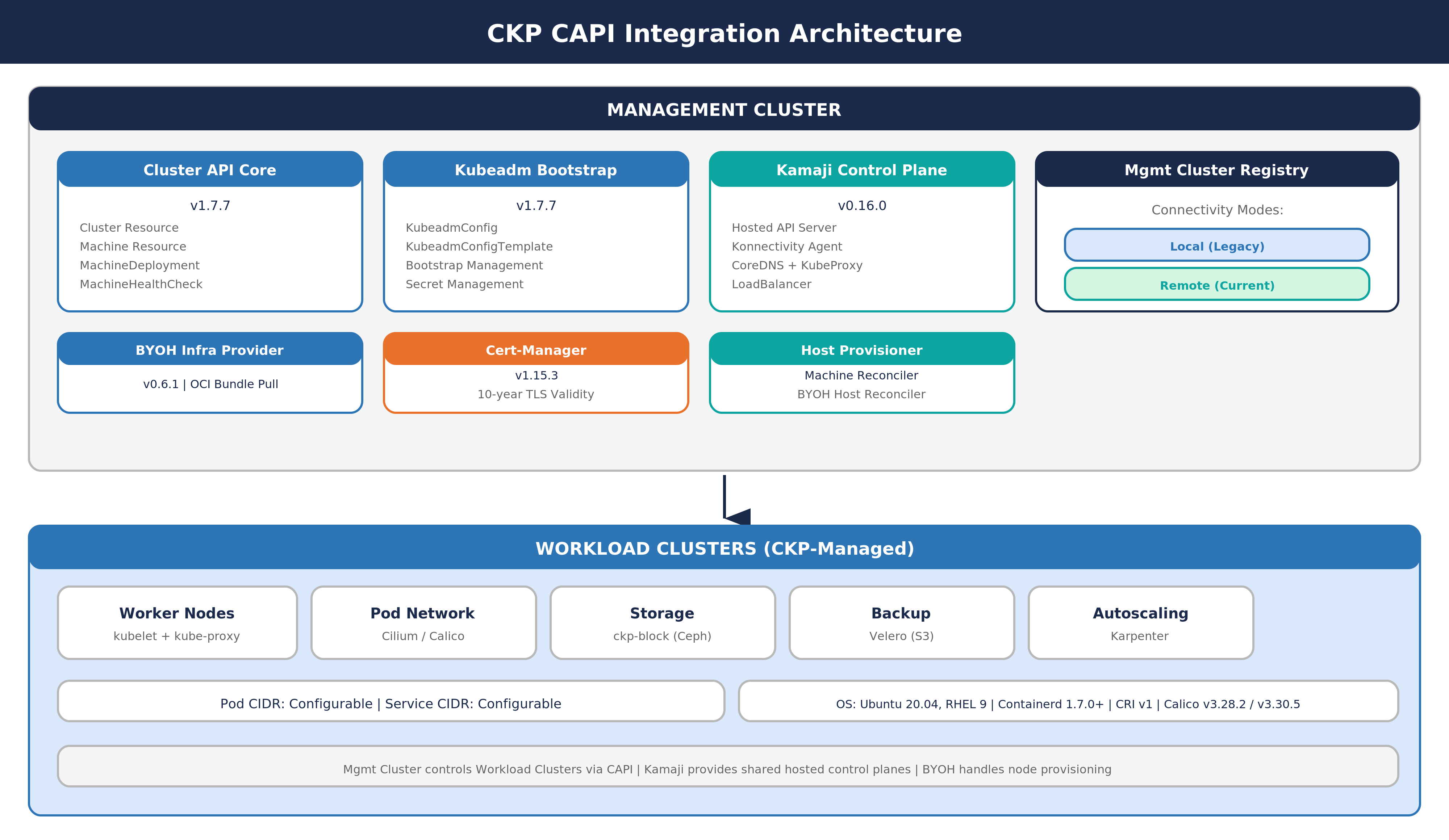
9.1 CAPI Provider Versions
| Provider | Type | Version |
|---|---|---|
| Cluster API | Core Provider | v1.7.7 |
| Kubeadm | Bootstrap Provider | v1.7.7 |
| Kubeadm | Control Plane Provider | v1.7.7 |
| BYOH | Infrastructure Provider | v0.6.1 |
| Managed Control Plane | Control Plane Provider | - |
| Cert-Manager | Certificate Management | v1.15.3 |
9.2 Managed Control Plane
CKP uses Managed Control Plane as the hosted control plane provider. For each managed cluster, the Managed Control Plane creates a full set of CAPI resources including the control plane (with Konnectivity agent, CoreDNS, KubeProxy, and LoadBalancer), the BYOH infrastructure binding, machine deployment configurations, and bootstrap templates. This approach keeps control plane components off the worker nodes, reducing resource overhead and simplifying management.
9.3 Default Network Configuration
| Network | Configuration |
|---|---|
| Pod Network | Configurable CIDR, set during cluster creation (CAPI-managed and standalone use different defaults) |
| Service Network | Configurable CIDR, set during cluster initialization |
| Default CNI | Cilium (CAPI-managed clusters), Calico (standalone clusters) |
10 Host Agent
The CKP Host Agent is a lightweight agent installed on every machine that participates in a CKP cluster. It serves as the communication bridge between individual hosts and the CKP management plane.
| Capability | Description |
|---|---|
| Registration | Registers the host with the CKP management controller |
| Configuration | Manages the connection to the controller and cluster settings |
| BYOH Integration | Handles the Bring Your Own Host lifecycle for CAPI-provisioned clusters |
| Upgrade | Supports in-place agent binary upgrades |
| Health Reporting | Reports host status and health to the management plane via WebSocket |
11 Host Provisioner
The CKP Host Provisioner is a multi-cluster controller responsible for managing the lifecycle of machines within CKP clusters. It operates two reconciliation loops:
| Reconciler | Purpose |
|---|---|
| Machine Reconciler | Manages CAPI Machine resources, ensuring the desired number of nodes are provisioned and healthy |
| BYOH Host Reconciler | Manages Bring Your Own Host resources, handling host registration and bootstrap |
Host Status Lifecycle: When a machine host is created, it transitions through a status lifecycle starting from Create Pending, and resolving to either Create Completed (successful provisioning) or Create Failed (provisioning error).
12 Machine Host Management APIs
CKP provides a comprehensive set of REST APIs for managing machine hosts within the platform. All APIs are scoped to a domain and project, supporting multi-tenant isolation.
12.1 Host Pre-Shared Key (PSK) and Host Requests
These APIs manage the host authentication process. The PSK is used by host agents to authenticate when registering with the management plane. Host request APIs allow administrators to view, approve, or reject pending host registrations — both individually and in bulk.
| API Category | Operations |
|---|---|
| Host PSK | Retrieve and reset the pre-shared key for host authentication |
| Host Requests | List pending requests, view individual request details, approve/reject individual requests, bulk approve/reject |
12.2 Host Management
Core CRUD operations for managing registered hosts, including listing all hosts in a project, retrieving details for a specific host, deleting individual hosts, and bulk-deleting multiple hosts.
12.3 Host Groups
Host groups allow administrators to organize registered hosts into logical groups for cluster assignment. These APIs support creating, listing, retrieving, updating, and deleting host groups, as well as managing group membership by adding or removing individual hosts or performing bulk membership operations.
12.4 MachineHost Service (Compass)
The Compass platform exposes an additional gRPC-based MachineHost service with operations for adding, retrieving, updating, and deleting machine hosts, as well as provisioning hosts and checking their status. This service complements the REST APIs and is used internally by the platform.
13 Provider Cluster APIs
CKP exposes REST APIs for managing provider cluster configurations. These APIs handle the mapping between CKP clusters and their underlying infrastructure providers.
| API Category | Operations |
|---|---|
| Provider Cluster CRUD | Create, update, and delete provider cluster configurations |
| Provider Cluster Lookup | Retrieve provider clusters by name, by cluster ID, or list all within a domain or project |
| Provider Validation | Check whether a domain has a provider cluster configured, and verify provider domain status |
| Unscoped Queries | List all provider clusters across domains (for platform-level administration) |
All provider cluster APIs support both domain-scoped and project-scoped operations, ensuring multi-tenant isolation while allowing platform-wide visibility when needed.
14 Management Cluster Registry
The Management Cluster Registry provides centralized access to CAPI management clusters used by CKP. It supports two connectivity modes:
| Mode | Description |
|---|---|
| Local (Legacy) | Connects to the management cluster running in the same cluster using an in-cluster Kubernetes client |
| Remote (Current) | Connects to an external management cluster via a secure tunnel, identified by a unique cluster ID |
This registry allows CKP to manage multiple CAPI management clusters from a single control point, enabling multi-cluster operations.
15 Storage Plugin
CKP provides a built-in storage plugin that delivers persistent block storage for cluster workloads.
| Property | Details |
|---|---|
| Storage Backend | Ceph (managed by the CKP storage plugin) |
| Default Storage Class | ckp-block — configured with a Delete reclaim policy and volume expansion enabled |
| Deployment | Installed as a Helm chart in a dedicated storage namespace |
For standalone installations (outside CAPI-managed clusters), OpenEBS hostpath is used as the default CSI driver and storage class.
16 Backup (Velero)
CKP integrates Velero for cluster backup and disaster recovery. The backup system provides S3-compatible storage location management, backup storage location lifecycle handling (creation, updates, deletion), cloud provider and endpoint configuration, and project-level backup location isolation. Velero is deployed as an addon within the cluster and managed by the Compass platform.
17 Certificate Management
CKP includes a built-in certificate management system that handles TLS certificates for cluster communication. Certificates are issued with a 10-year validity period, ensuring long-term operational stability without frequent renewal. The certificate manager integrates with a Root CA for trust chain establishment and stores certificate metadata in the platform database for lifecycle tracking and management.
18 Cluster Lifecycle (End-to-End via CAPI)
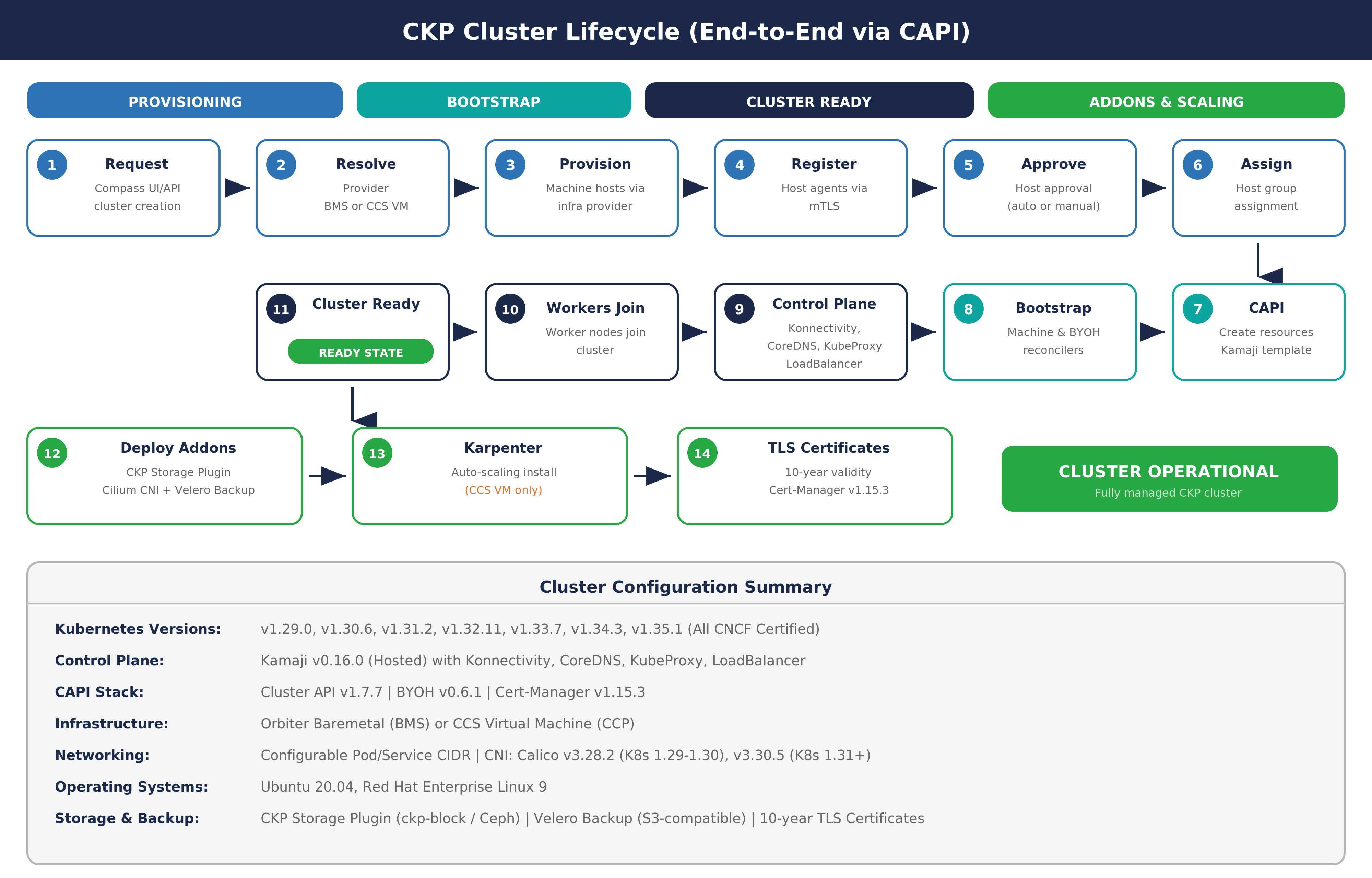
The full end-to-end lifecycle for a CAPI-managed CKP cluster:
- User requests a managed cluster via the Compass UI or API
- The Orbiter Baremetal provider cluster is resolved
- Machine hosts are provisioned through the infrastructure provider
- Host agents register with the management plane via mutual TLS (mTLS)
- Hosts are approved (automatically or manually, depending on configuration)
- Approved hosts are assigned to the designated host group
- CAPI resources are created using the Managed Control Plane template
- The Machine Reconciler and BYOH Host Reconciler drive the bootstrap process
- The Managed Control Plane comes up with Konnectivity, CoreDNS, KubeProxy, and LoadBalancer
- Worker nodes join the cluster via the bootstrap configuration
- The cluster reaches Ready state
- Addons are deployed: CKP Storage Plugin, Cilium CNI, and Velero backup
- TLS certificates are issued with 10-year validity
19 Build Artifacts
CKP produces two primary container images for its management layer:
| Image | Description |
|---|---|
| Cluster Manager | Contains the host agent packages (for both Debian and RPM-based systems) and the CAPI provider controllers |
| Host Provisioner | Contains the host provisioner controller binary responsible for machine lifecycle reconciliation |
Both images are built on a minimal, security-hardened base image and run as non-root processes.
20 Troubleshooting
Container Runtime Not Running (Shows Active)
If the container runtime appears active in system status but containers are not running, verify that the Containerd configuration file does not have any plugins incorrectly listed in the disabled plugins field. Ensure the field is set to an empty list, then restart the Containerd service. If Containerd was not installed, install it through the appropriate package manager before proceeding.
21 Glossary
| Term | Definition |
|---|---|
| CKP | Coredge Kubernetes Platform — Coredge's custom Kubernetes distribution |
| CAPI | Cluster API — Kubernetes sub-project for declarative cluster lifecycle management |
| BYOH | Bring Your Own Host — Infrastructure provider for pre-existing hosts |
| Managed Control Plane | Hosted control plane provider used by CKP |
| Compass | Coredge platform for CKP cluster management (UI and API) |
| Calico | Default CNI in Compass UI (v3.30.5) |
| Cilium | eBPF-based CNI, default in CAPI-provisioned clusters |
| Velero | Backup and disaster recovery tool integrated in CKP |
| imgpkg | OCI image tool used to pull BYOH bundles onto target hosts |
| Konnectivity | Agent for secure management-to-worker communication in Managed Control Planes |
| BMS | Baremetal Server — Orbiter Baremetal infrastructure provider |
| PSK | Pre-Shared Key — Used for host agent authentication |
| mTLS | Mutual TLS — Two-way certificate-based authentication |
| OCI | Open Container Initiative — Standard for container image formats |
| PGP | Pretty Good Privacy — Used for CKP package signing |