Architecture
Architecture Tiers
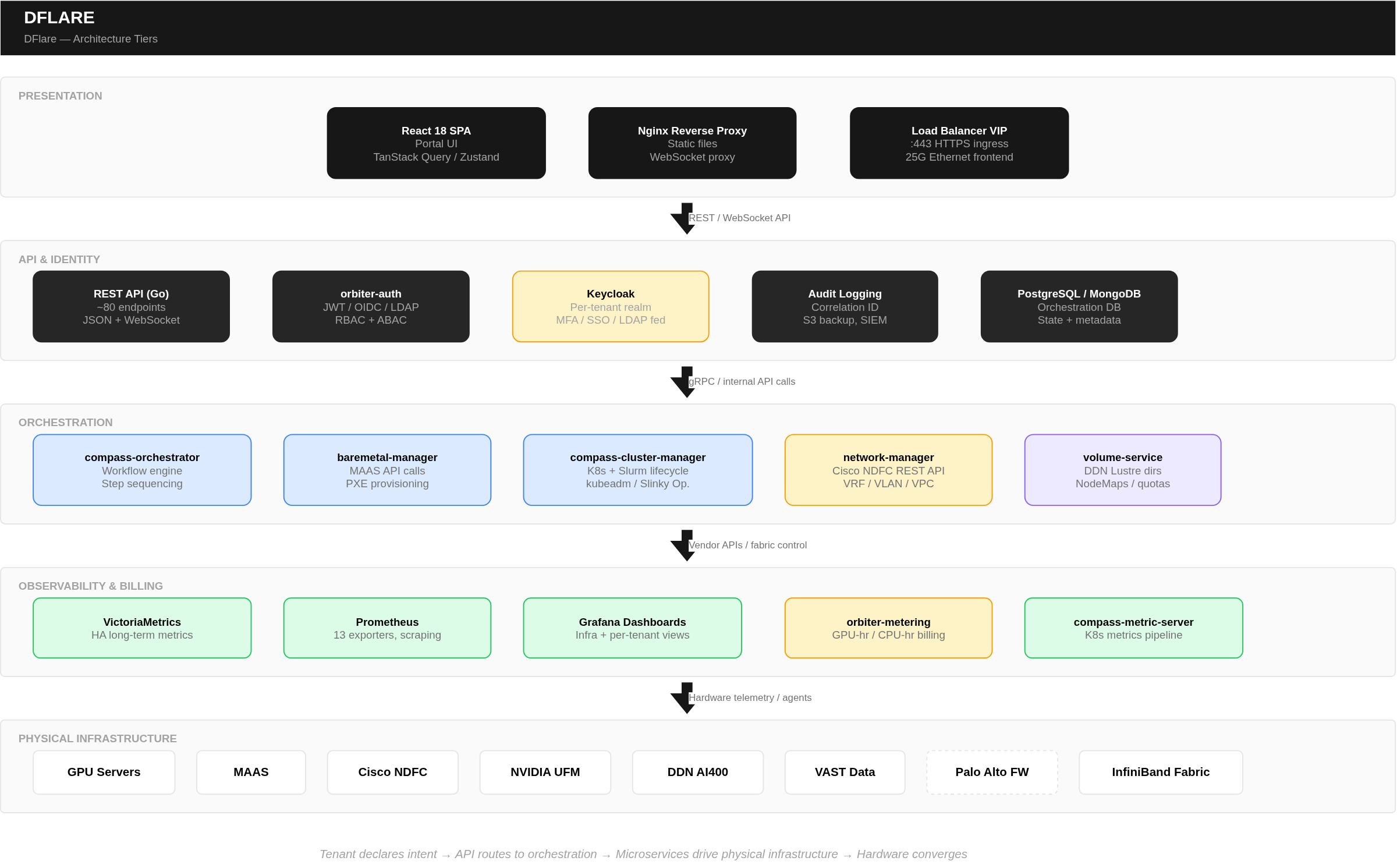
Platform Component Map
| Layer | Components | Technology |
|---|---|---|
| Portal & API | Orchestration UI, REST APIs, WebSocket status | Modern web framework, microservices, relational & document databases, caching layer |
| Identity & Access | Authentication, authorization, tenant mgmt | Enterprise IAM (OAuth2/OIDC), JWT, RBAC + ABAC |
| Compute Orchestration | Cluster lifecycle, workload management | Kubernetes, Slurm (operator-based) |
| Network Fabric | Tenant isolation, VLAN/VRF management | Ethernet fabric controller, VXLAN/EVPN, IB fabric manager |
| Storage | High-performance GPU + platform storage | Parallel filesystem (InfiniBand), Object/file storage (Ethernet) |
| GPU Runtime | GPU access, telemetry, scheduling | Multi-vendor GPU operators |
| Monitoring | Metrics, alerting, dashboards | HA time-series database, metric collectors, dashboarding |
| Billing | Usage tracking, quota, reporting | Metering service, relational database |
| Container Runtime | Container lifecycle on bare metal | OCI-compliant container runtime |
Key Microservices
- Bare Metal Manager — Bare metal provisioning; translates portal requests into bare metal controller API calls
- Workflow Orchestrator — Workflow engine; handles provisioning logic, scheduling, and step sequencing
- Cluster Manager — Kubernetes and Slurm cluster lifecycle management
- Network Manager — Interfaces with fabric controller for VRF/VLAN operations
- Volume Service — Parallel filesystem provisioning; directories, access control maps, quotas
- Auth Service — IAM integration for multi-tenant RBAC/ABAC enforcement
- Metering Service — Usage aggregation, billing calculation, quota tracking
- Metric Server — Kubernetes metrics processing for tenant clusters
- Container Registry — Internal image registry for air-gapped deployments
Infrastructure Specifications
Compute
| Specification | Detail |
|---|---|
| Supported Servers | Enterprise GPU server platforms from multiple vendors |
| Supported GPUs | NVIDIA, AMD, and Intel accelerators (various models) |
| GPUs per Node | Configurable — typically multiple GPUs per node |
| GPU Interconnect | Vendor-specific high-bandwidth intra-node GPU links |
| InfiniBand Links | Multiple high-bandwidth links per node (configurable) |
| Ethernet | Frontend management network |
| Maximum Nodes | Scalable to thousands of nodes per deployment |
| Maximum GPUs | Scalable to thousands of accelerators per deployment |
Network
| Fabric | Technology | Speed |
|---|---|---|
| GPU-to-GPU (training) | InfiniBand via RDMA/collective communications | High-bandwidth, multiple links per node |
| GPU-to-Storage (data) | InfiniBand via parallel filesystem/RDMA | High-bandwidth, multiple links per node |
| Platform Services | Ethernet (dedicated VLAN) | Standard datacenter Ethernet |
| Tenant Isolation | VRF (VXLAN/EVPN) + IB Partition Key | Hardware-enforced |
Performance Tuning (Applied via Golden OS Image)
BIOS Settings:
- Performance profile, C-states disabled — Maximum clock speeds, zero power-save latency
- NUMA alignment enabled — GPU PCIe aligned to nearest CPU socket
- PCIe ASPM disabled, virtualization off — Zero overhead for bare metal GPU workloads
OS Settings: 4. CPU governor: performance — Locked maximum frequency 5. Huge pages: always — Optimized GPU memory allocation 6. IOMMU enabled with passthrough — Direct device passthrough for accelerators